支持

支持

请仅在使用服务时遇到问题的情况下联系我们。
我们不提供网络安全咨询,不回复商业提案,不对任何信息发表评论,也不披露产品开发计划。

请在不使用AI的情况下(我们会忽略AI生成的内容),严格按照以下格式尽可能详细地描述问题:
  • 1. 问题出现在哪台设备上?
  • 2. 您所在的国家/地区是?
  • 3. 问题的具体表现是什么?最好附上截图或视频。
  • 4. 任何其他信息,有助于我们尽可能全面地了解问题。

支持团队将在24小时内回复,但在某些情况下等待时间可能会更长。
请勿重复发送消息。

支持

您已受 Red Shield VPN 保护
Red Shield VPNRed Shield VPN
🇬🇧 English🇷🇺 Русский
订阅
  • 关于
  • 应用
  • 节点
  • 价格
  • 帮助
  • 账户
  • Applications
    • Android
      • Installation and use
      • Problem solving
        • VPN sometimes disconnects
    • iOS (iPhone / iPad)
      • Installation and use
    • Windows
      • Installation and use
      • Split Tunneling
    • macOS
      • Installation and use
      • Kill Switch and VPN Only Access
  • VPN Setup on Routers
    • Keenetic
      • AmneziaWG on Keenetic
      • WireGuard on Keenetic
    • Mikrotik
      • Wireguard on Mikrotik
    • OpenWrt
      • AmneziaWG 2 on OpenWrt (Podkop)
      • WireGuard on OpenWrt
      • VLESS on OpenWrt (Podkop)
  • VPN Setup on Linux
    • VLESS on Ubuntu & Debian with GUI
    • AmneziaWG 2 on Ubuntu & Debian CLI
    • WireGuard on Ubuntu with GUI
    • WireGuard on Ubuntu & Debian CLI
  • Support
    • ❗ Answers to frequently asked questions
    • Support
  • Red Shield VPN
    • About
    • What is VPN?
    • Bug Bounty
    • Warrant Canary
    • Terms of Service
    • Refund Policy
    • Privacy Policy
    • Auto-renewal Terms
  • Features
    • RedLink Protocols
    • Double VPN
    • IPv6 leak protection
    • DNS leak protection
    • Kill Switch

在iOS上安装和使用VPN


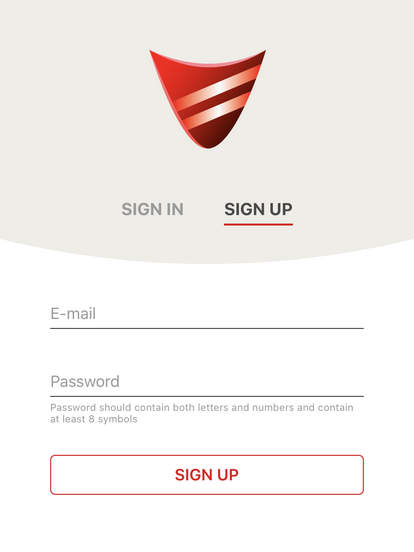
1. 安装并运行 Red Shield VPN 应用。要注册,请输入您的邮箱和密码;如果您已在 Red Shield VPN 注册,请使用已有账户登录。


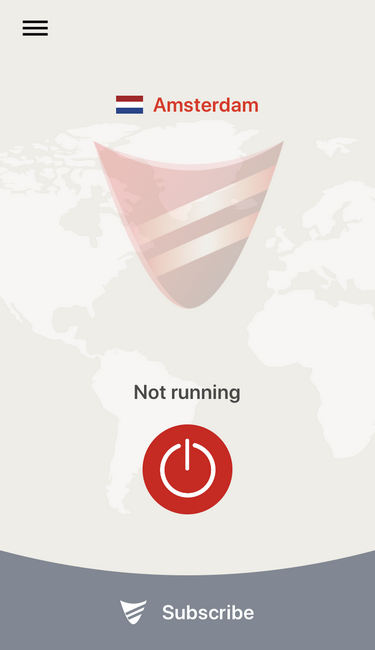
2. 如果尚未付款,请点击 “Subscribe Now” 按钮来支付订阅费用。付款完成后,点击连接按钮。


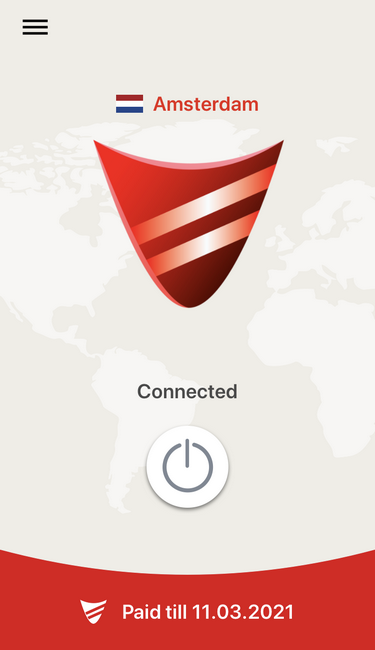
3. 如果连接成功,状态会变为 “Connected”。要断开连接,请点击中间的按钮。


Red Shield VPN
  • 关于
  • 价格
  • 应用
  • 节点
  • 账户
帮助
  • 什么是 VPN
  • 常见问题
  • 支持
  • Terms of Service
  • Privacy Policy
  • Refund Policy

© 2017-2026, Red Shield VPN
保留所有权利

Private Network Labs LLC
2171 SPRING STREET
HAMILTON, NY, 13346